
Laravel Telescope
简介
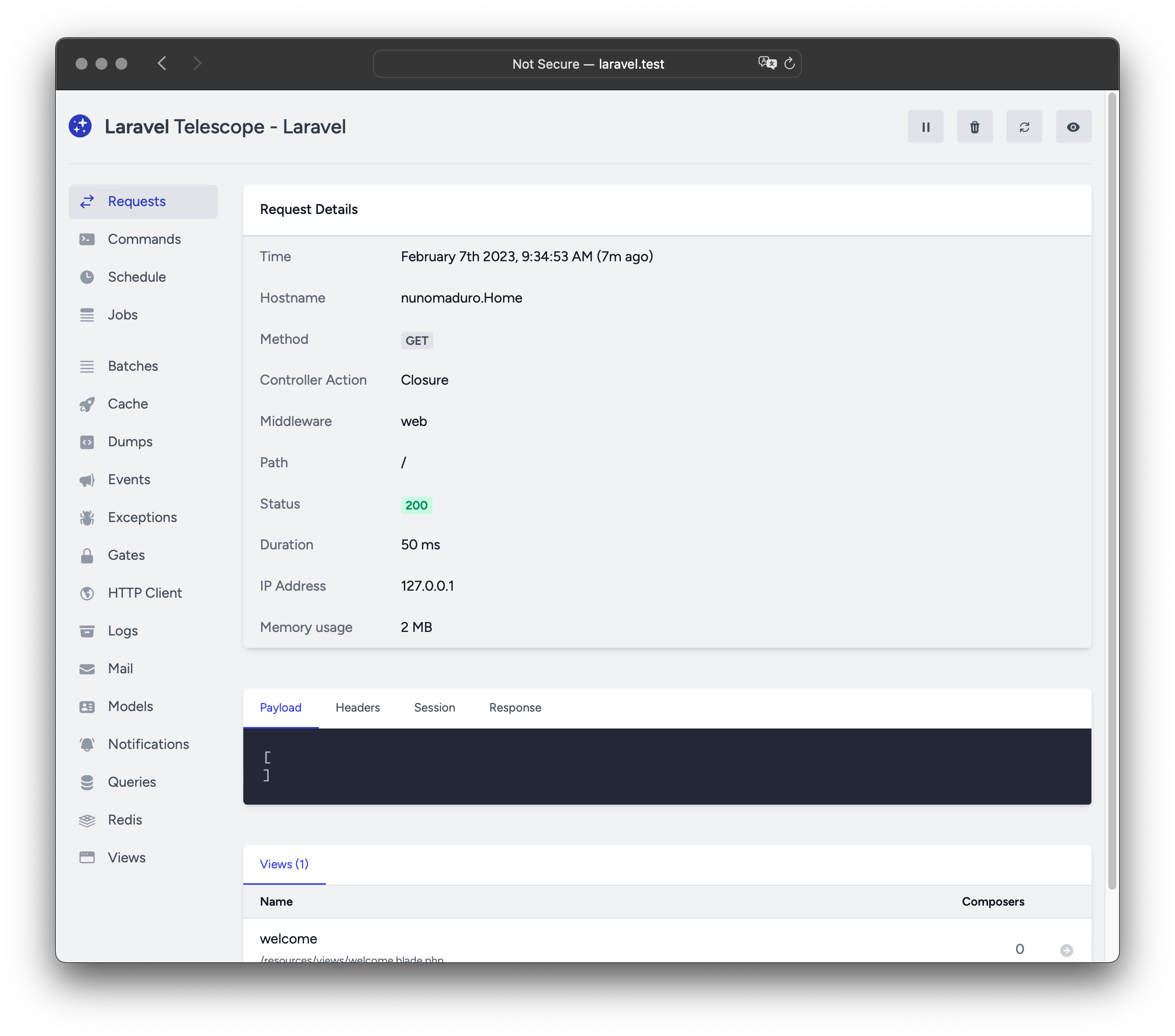
Laravel Telescope 是您本地 Laravel 开发环境的绝佳伴侣。Telescope 提供了对进入应用程序的请求、异常、日志条目、数据库查询、队列作业、邮件、通知、缓存操作、计划任务、变量转储等的洞察。
安装
您可以使用 Composer 包管理器将 Telescope 安装到您的 Laravel 项目中:
composer require laravel/telescope安装 Telescope 后,使用 telescope:install Artisan 命令发布其资源和迁移。安装 Telescope 后,您还应该运行 migrate 命令,以创建存储 Telescope 数据所需的表:
php artisan telescope:install

php artisan migrate最后,您可以通过 /telescope 路由访问 Telescope 仪表板。
仅本地安装
如果您计划仅使用 Telescope 辅助本地开发,可以使用 --dev 标志安装 Telescope:
composer require laravel/telescope --dev

php artisan telescope:install

php artisan migrate运行 telescope:install 后,您应该从应用程序的 bootstrap/providers.php 配置文件中删除 TelescopeServiceProvider 服务提供者注册。相反,在 App\Providers\AppServiceProvider 类的 register 方法中手动注册 Telescope 的服务提供者。我们将在注册提供者之前确保当前环境是 local:
/**
 * 注册任何应用程序服务。
 */
public function register(): void
{
    if ($this->app->environment('local') && class_exists(\Laravel\Telescope\TelescopeServiceProvider::class)) {
        $this->app->register(\Laravel\Telescope\TelescopeServiceProvider::class);
        $this->app->register(TelescopeServiceProvider::class);
    }
}最后,您还应该通过将以下内容添加到 composer.json 文件来防止 Telescope 包被自动发现:
"extra": {
    "laravel": {
        "dont-discover": [
            "laravel/telescope"
        ]
    }
},配置
发布 Telescope 的资源后,其主要配置文件将位于 config/telescope.php。此配置文件允许您配置监视器选项。每个配置选项都包含其用途的描述,因此请务必彻底探索此文件。
如果需要,您可以使用 enabled 配置选项完全禁用 Telescope 的数据收集:
'enabled' => env('TELESCOPE_ENABLED', true),数据修剪
如果不进行修剪,telescope_entries 表可能会非常快地积累记录。为了缓解这种情况,您应该调度 telescope:prune Artisan 命令每天运行:
use Illuminate\Support\Facades\Schedule;

Schedule::command('telescope:prune')->daily();默认情况下,将修剪所有超过 24 小时的条目。您可以在调用命令时使用 hours 选项确定保留 Telescope 数据的时间。例如,以下命令将删除所有在 48 小时前创建的记录:
use Illuminate\Support\Facades\Schedule;

Schedule::command('telescope:prune --hours=48')->daily();仪表板授权
可以通过 /telescope 路由访问 Telescope 仪表板。默认情况下,您只能在 local 环境中访问此仪表板。在 app/Providers/TelescopeServiceProvider.php 文件中,有一个授权门定义。此授权门控制非本地环境中对 Telescope 的访问。您可以根据需要自由修改此门,以限制对 Telescope 安装的访问:
use App\Models\User;

/**
 * 注册 Telescope 门。
 *
 * 此门确定谁可以在非本地环境中访问 Telescope。
 */
protected function gate(): void
{
    Gate::define('viewTelescope', function (User $user) {
        return in_array($user->email, [
            'taylor@laravel.com',
        ]);
    });
}WARNING
您应该确保在生产环境中将 APP_ENV 环境变量更改为 production。否则,您的 Telescope 安装将公开可用。
升级 Telescope
升级到新版本的 Telescope 时,重要的是仔细查看升级指南。
此外,升级到任何新版本的 Telescope 时,您应该重新发布 Telescope 的资源:
php artisan telescope:publish为了保持资源最新并避免将来更新中的问题,您可以将 vendor:publish --tag=laravel-assets 命令添加到应用程序 composer.json 文件中的 post-update-cmd 脚本:
{
    "scripts": {
        "post-update-cmd": [
            "@php artisan vendor:publish --tag=laravel-assets --ansi --force"
        ]
    }
}过滤
条目
您可以通过 App\Providers\TelescopeServiceProvider 类中定义的 filter 闭包过滤 Telescope 记录的数据。默认情况下,此闭包在 local 环境中记录所有数据,在所有其他环境中记录异常、失败的作业、计划任务和带有监视标签的数据:
use Laravel\Telescope\IncomingEntry;
use Laravel\Telescope\Telescope;

/**
 * 注册任何应用程序服务。
 */
public function register(): void
{
    $this->hideSensitiveRequestDetails();

    Telescope::filter(function (IncomingEntry $entry) {
        if ($this->app->environment('local')) {
            return true;
        }

        return $entry->isReportableException() ||
            $entry->isFailedJob() ||
            $entry->isScheduledTask() ||
            $entry->isSlowQuery() ||
            $entry->hasMonitoredTag();
    });
}批次
虽然 filter 闭包过滤单个条目的数据,但您可以使用 filterBatch 方法注册一个闭包来过滤给定请求或控制台命令的所有数据。如果闭包返回 true,则所有条目都将被 Telescope 记录:
use Illuminate\Support\Collection;
use Laravel\Telescope\IncomingEntry;
use Laravel\Telescope\Telescope;

/**
 * 注册任何应用程序服务。
 */
public function register(): void
{
    $this->hideSensitiveRequestDetails();

    Telescope::filterBatch(function (Collection $entries) {
        if ($this->app->environment('local')) {
            return true;
        }

        return $entries->contains(function (IncomingEntry $entry) {
            return $entry->isReportableException() ||
                $entry->isFailedJob() ||
                $entry->isScheduledTask() ||
                $entry->isSlowQuery() ||
                $entry->hasMonitoredTag();
            });
    });
}标签
Telescope 允许您通过「标签」搜索条目。通常,标签是 Eloquent 模型类名或经过身份验证的用户 ID,Telescope 会自动将其添加到条目中。有时,您可能希望将自己的自定义标签附加到条目。为此,可以使用 Telescope::tag 方法。tag 方法接受一个应返回标签数组的闭包。闭包返回的标签将与 Telescope 自动附加到条目的任何标签合并。通常,您应该在 App\Providers\TelescopeServiceProvider 类的 register 方法中调用 tag 方法:
use Laravel\Telescope\EntryType;
use Laravel\Telescope\IncomingEntry;
use Laravel\Telescope\Telescope;

/**
 * 注册任何应用程序服务。
 */
public function register(): void
{
    $this->hideSensitiveRequestDetails();

    Telescope::tag(function (IncomingEntry $entry) {
        return $entry->type === EntryType::REQUEST
            ? ['status:'.$entry->content['response_status']]
            : [];
    });
}可用监视器
Telescope「监视器」在执行请求或控制台命令时收集应用程序数据。您可以在 config/telescope.php 配置文件中自定义要启用的监视器列表:
'watchers' => [
    Watchers\CacheWatcher::class => true,
    Watchers\CommandWatcher::class => true,
    // ...
],某些监视器还允许您提供额外的自定义选项:
'watchers' => [
    Watchers\QueryWatcher::class => [
        'enabled' => env('TELESCOPE_QUERY_WATCHER', true),
        'slow' => 100,
    ],
    // ...
],批次监视器
批次监视器记录有关队列批次的信息,包括作业和连接信息。
缓存监视器
缓存监视器在缓存键被命中、未命中、更新和遗忘时记录数据。
命令监视器
命令监视器在执行 Artisan 命令时记录参数、选项、退出代码和输出。如果您希望从监视器记录中排除某些命令,可以在 config/telescope.php 文件的 ignore 选项中指定命令:
'watchers' => [
    Watchers\CommandWatcher::class => [
        'enabled' => env('TELESCOPE_COMMAND_WATCHER', true),
        'ignore' => ['key:generate'],
    ],
    // ...
],Dump 监视器
Dump 监视器记录并在 Telescope 中显示您的变量转储。使用 Laravel 时,可以使用全局 dump 函数转储变量。Dump 监视器选项卡必须在浏览器中打开才能记录转储,否则转储将被监视器忽略。
事件监视器
事件监视器记录应用程序分发的任何事件的有效负载、监听器和广播数据。Laravel 框架的内部事件被事件监视器忽略。
异常监视器
异常监视器记录应用程序抛出的任何可报告异常的数据和堆栈跟踪。
Gate 监视器
Gate 监视器记录应用程序门和策略检查的数据和结果。如果您希望从监视器记录中排除某些能力,可以在 config/telescope.php 文件的 ignore_abilities 选项中指定它们:
'watchers' => [
    Watchers\GateWatcher::class => [
        'enabled' => env('TELESCOPE_GATE_WATCHER', true),
        'ignore_abilities' => ['viewNova'],
    ],
    // ...
],HTTP 客户端监视器
HTTP 客户端监视器记录应用程序发出的传出 HTTP 客户端请求。
作业监视器
作业监视器记录应用程序分发的任何作业的数据和状态。
日志监视器
日志监视器记录应用程序写入的任何日志数据。
默认情况下,Telescope 仅记录 error 级别及以上的日志。但是,您可以在应用程序的 config/telescope.php 配置文件中修改 level 选项来更改此行为:
'watchers' => [
    Watchers\LogWatcher::class => [
        'enabled' => env('TELESCOPE_LOG_WATCHER', true),
        'level' => 'debug',
    ],

    // ...
],邮件监视器
邮件监视器允许您在浏览器中查看应用程序发送的电子邮件及其相关数据的预览。您还可以将电子邮件下载为 .eml 文件。
模型监视器
模型监视器在分发 Eloquent 模型事件时记录模型更改。您可以通过监视器的 events 选项指定应记录哪些模型事件:
'watchers' => [
    Watchers\ModelWatcher::class => [
        'enabled' => env('TELESCOPE_MODEL_WATCHER', true),
        'events' => ['eloquent.created*', 'eloquent.updated*'],
    ],
    // ...
],如果您希望记录给定请求期间水合的模型数量,请启用 hydrations 选项:
'watchers' => [
    Watchers\ModelWatcher::class => [
        'enabled' => env('TELESCOPE_MODEL_WATCHER', true),
        'events' => ['eloquent.created*', 'eloquent.updated*'],
        'hydrations' => true,
    ],
    // ...
],通知监视器
通知监视器记录应用程序发送的所有通知。如果通知触发电子邮件并且您启用了邮件监视器,则该电子邮件也将在邮件监视器屏幕上提供预览。
查询监视器
查询监视器记录应用程序执行的所有查询的原始 SQL、绑定和执行时间。监视器还将任何慢于 100 毫秒的查询标记为 slow。您可以使用监视器的 slow 选项自定义慢查询阈值:
'watchers' => [
    Watchers\QueryWatcher::class => [
        'enabled' => env('TELESCOPE_QUERY_WATCHER', true),
        'slow' => 50,
    ],
    // ...
],Redis 监视器
Redis 监视器记录应用程序执行的所有 Redis 命令。如果您使用 Redis 进行缓存,则缓存命令也将被 Redis 监视器记录。
请求监视器
请求监视器记录与应用程序处理的任何请求相关的请求、标头、会话和响应数据。您可以通过 size_limit(以千字节为单位)选项限制记录的响应数据:
'watchers' => [
    Watchers\RequestWatcher::class => [
        'enabled' => env('TELESCOPE_REQUEST_WATCHER', true),
        'size_limit' => env('TELESCOPE_RESPONSE_SIZE_LIMIT', 64),
    ],
    // ...
],调度监视器
调度监视器记录应用程序运行的任何计划任务的命令和输出。
视图监视器
视图监视器记录渲染视图时使用的视图名称、路径、数据和「组合器」。
显示用户头像
Telescope 仪表板显示保存给定条目时经过身份验证用户的用户头像。默认情况下,Telescope 将使用 Gravatar 网络服务检索头像。但是,您可以通过在 App\Providers\TelescopeServiceProvider 类中注册回调来自定义头像 URL。回调将接收用户的 ID 和电子邮件地址,并应返回用户的头像图像 URL:
use App\Models\User;
use Laravel\Telescope\Telescope;

/**
 * 注册任何应用程序服务。
 */
public function register(): void
{
    // ...

    Telescope::avatar(function (?string $id, ?string $email) {
        return ! is_null($id)
            ? '/avatars/'.User::find($id)->avatar_path
            : '/generic-avatar.jpg';
    });
}